

7 Common CNC Machining Design Mistakes to Avoid
Good CNC machining begins long before production starts—it begins with smart design. Even experienced engineers can unintentionally create features that increase machining time, raise manufacturing costs, and reduce part quality. By understanding the most common CNC machining design mistakes, you can improve manufacturability, reduce lead times, and achieve better production results.
This guide explains seven common design mistakes and provides practical recommendations to help engineers create stronger, more cost-effective CNC machined parts.
Why Avoiding Design Mistakes Matters
Poor design decisions often lead to longer machining cycles, higher tooling costs, excessive material waste, lower dimensional accuracy, and unnecessary engineering revisions. Applying Design for Manufacturability (DFM) principles early significantly improves quality while reducing production costs.
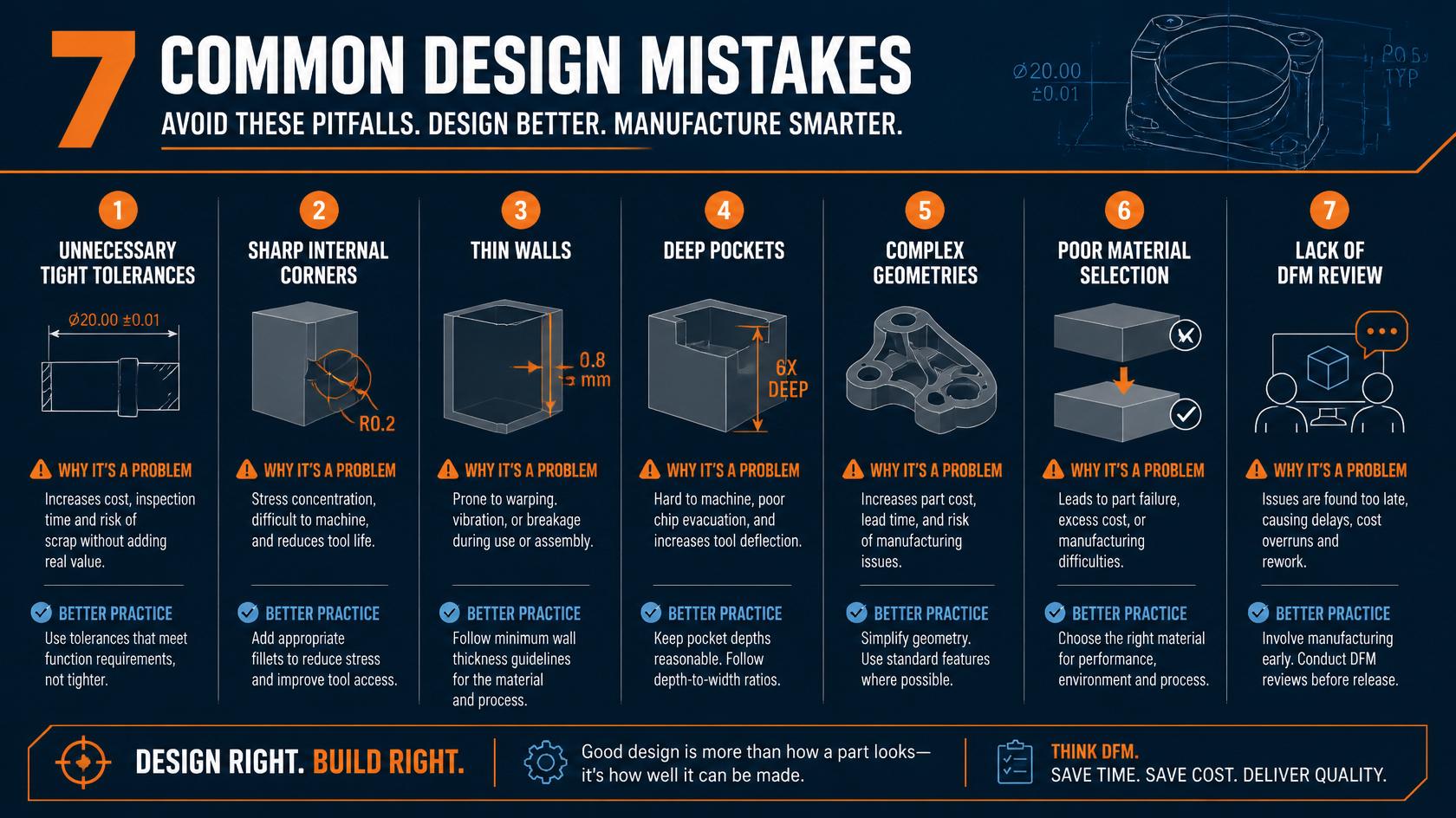
Figure 1: Seven common CNC machining design mistakes and best practices to avoid manufacturing problems.
1. Using Unnecessarily Tight Tolerances
One of the most expensive design mistakes is specifying extremely tight tolerances for every feature. High-precision machining requires slower cutting speeds, specialized tooling, additional quality inspections, and increased machining time.
Best Practice
- Apply tight tolerances only where functionality requires them.
- Use standard tolerances for non-critical features.
- Clearly identify critical dimensions on engineering drawings.
2. Designing Sharp Internal Corners
CNC cutting tools are cylindrical, making perfectly sharp internal corners impossible without special machining operations. Designing sharp corners increases machining complexity and often requires additional processes.
Best Practice
- Add internal fillets whenever possible.
- Use corner radii that match standard cutting tools.
- Larger radii improve tool life and reduce machining time.
3. Designing Thin Walls
Thin walls often vibrate during machining, causing dimensional inaccuracies, chatter marks, poor surface finish, and even part failure.
Recommended Guidelines
- Maintain sufficient wall thickness based on material type.
- Avoid tall unsupported thin sections.
- Increase rigidity wherever possible.
4. Creating Deep Narrow Pockets
Deep pockets require long cutting tools that are more prone to vibration and deflection. They also increase machining time and reduce overall accuracy.
Design Tips
- Keep pocket depth reasonable.
- Reduce unnecessary cavity depth.
- Design pockets for better chip evacuation.
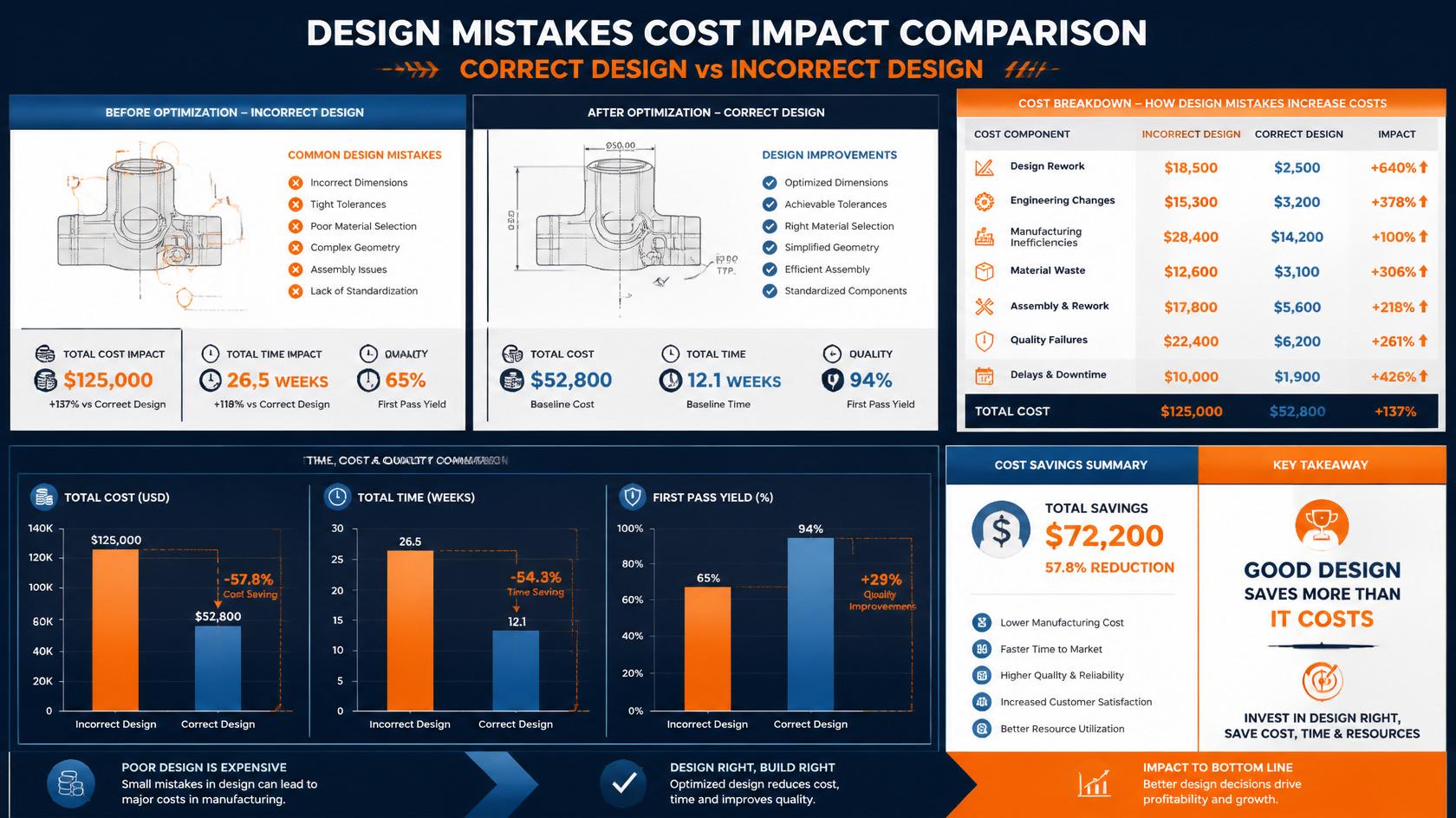
Figure 2: Poor design choices dramatically increase production cost, engineering changes, and manufacturing lead time.
5. Ignoring Tool Accessibility
Every feature on a CNC machined part must be accessible by a cutting tool. Features that are difficult to reach often require additional setups, specialized tooling, or multi-axis machining, all of which increase production costs. Poor tool accessibility also reduces machining accuracy and increases production time.
When designing a CNC part, always consider how the cutting tool will approach each feature and whether the part can be machined efficiently without unnecessary repositioning.
Best Practice
- Avoid hidden internal features whenever possible.
- Provide enough clearance for cutting tools.
- Design parts that require fewer machining setups.
- Consider fixturing during the design stage.
6. Using Poor Material Selection
Selecting the wrong material can increase machining costs, reduce tool life, and negatively affect the performance of the finished part. Every engineering material has unique machining characteristics, strength, corrosion resistance, and cost considerations.
Choosing materials based only on price may lead to premature part failure or unnecessary manufacturing complexity.
Material Selection Tips
- Select materials based on application requirements.
- Balance strength, machinability, and cost.
- Consider corrosion resistance and operating environment.
- Discuss alternative materials with your manufacturing partner.
7. Skipping Design for Manufacturability (DFM) Review
One of the biggest mistakes engineers make is sending parts directly to production without performing a Design for Manufacturability (DFM) review. Small design improvements discovered early can significantly reduce machining costs and improve production quality.
A DFM review evaluates geometry, tolerances, material selection, tooling accessibility, machining strategy, and manufacturing feasibility before production begins.
Engineering Tips
- Review CAD models before production.
- Verify tolerances and machining strategy.
- Simplify features wherever possible.
- Consult experienced CNC engineers during design.
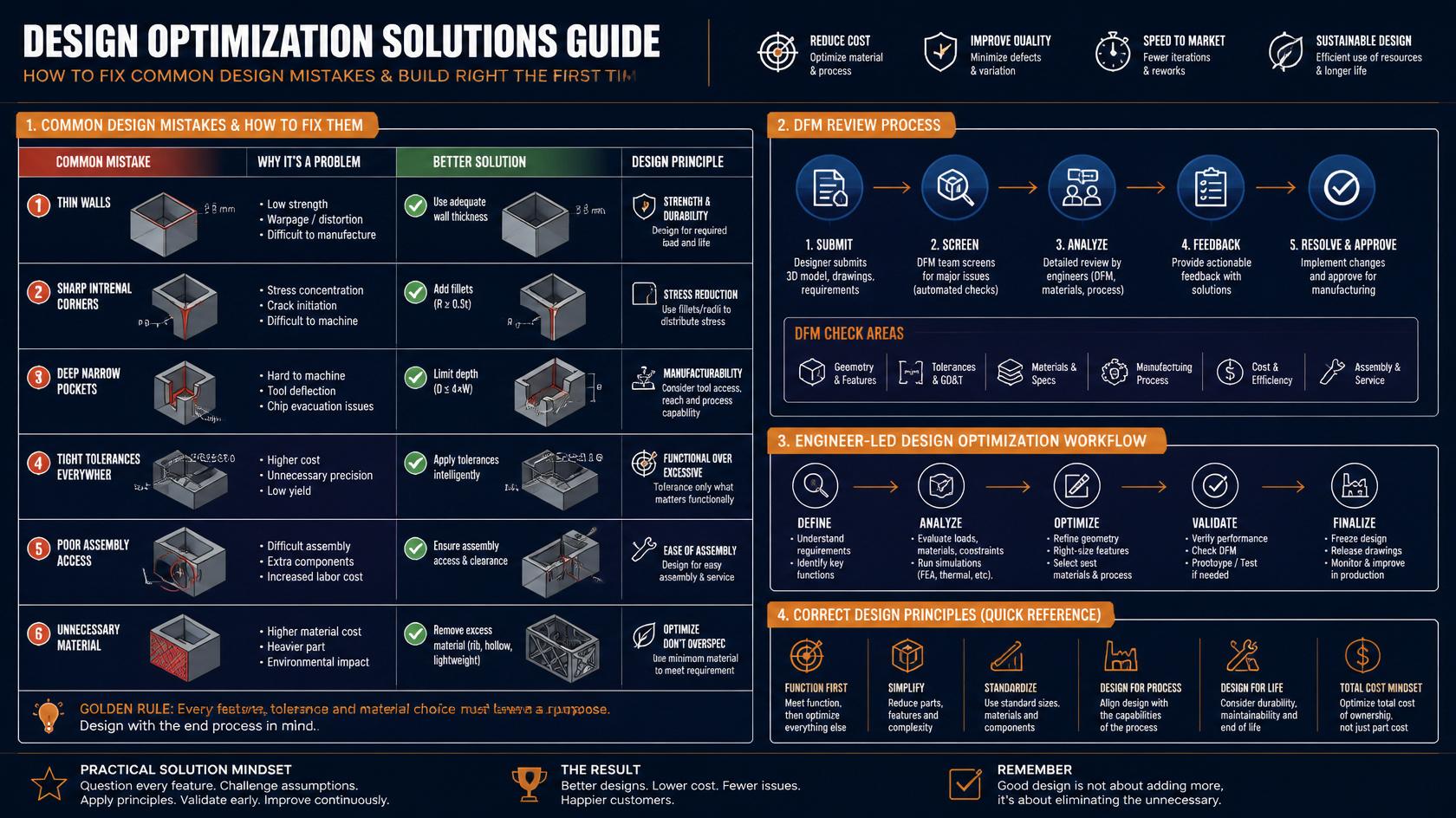
Figure 3: Following Design for Manufacturability (DFM) principles helps eliminate common design mistakes and improve production efficiency.
Quick Design Checklist
Before sending your CAD model for CNC machining, review the following checklist to avoid costly manufacturing issues.
Quick Design Checklist
- ✔ Apply tight tolerances only where necessary.
- ✔ Use generous internal radii.
- ✔ Maintain adequate wall thickness.
- ✔ Keep pocket depths reasonable.
- ✔ Ensure cutting tool accessibility.
- ✔ Choose the right engineering material.
- ✔ Complete a Design for Manufacturability (DFM) review.
Final Thoughts
Successful CNC machining begins with intelligent engineering design. Avoiding common design mistakes improves manufacturability, reduces machining costs, shortens lead times, and produces higher-quality parts.
Whether you’re designing functional prototypes or production components, applying Design for Manufacturability (DFM) principles early helps prevent expensive engineering changes later in the manufacturing process.